Reelish
A cross-platform media discovery and playback app
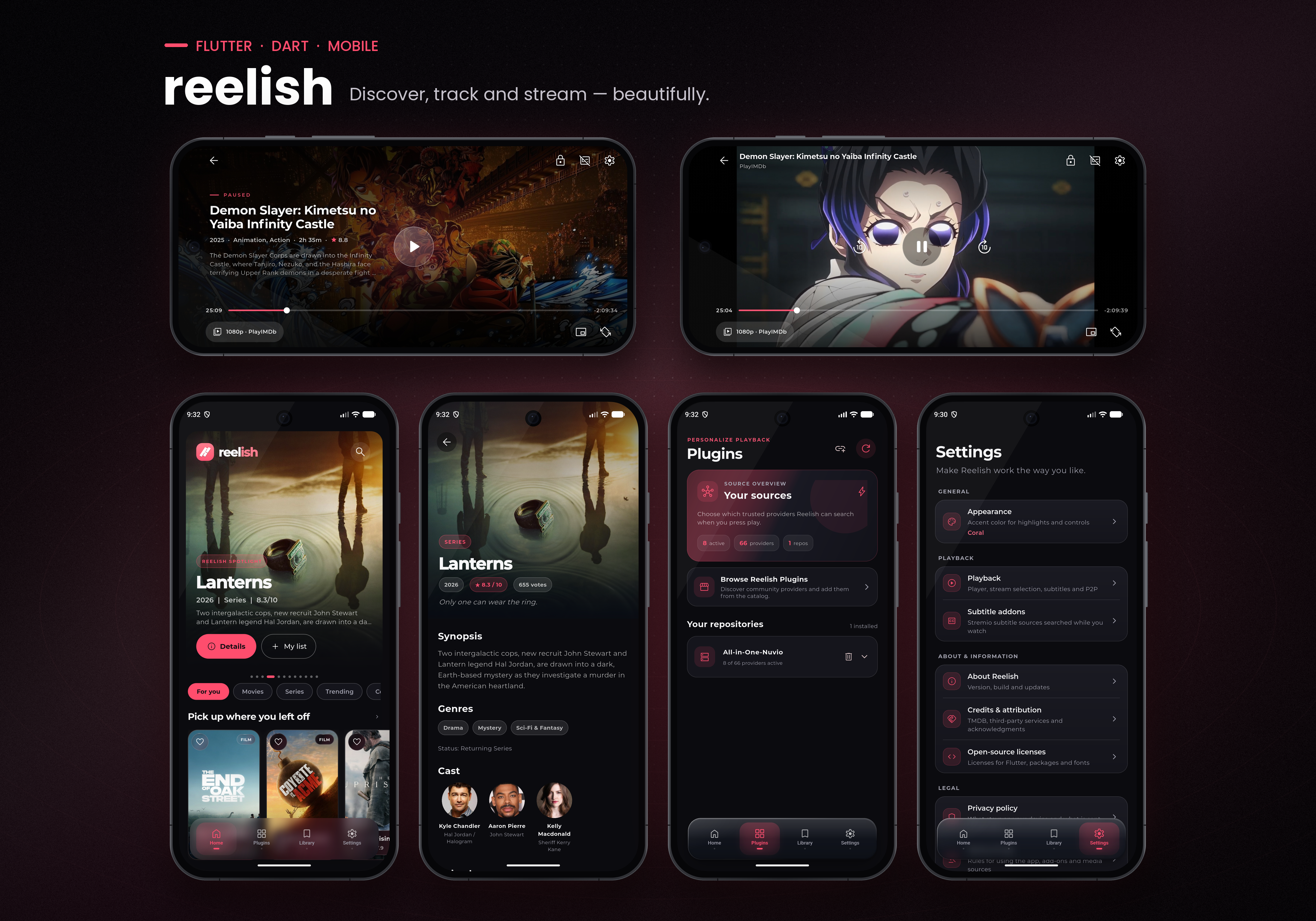
Overview
Reelish brings entertainment discovery, personal watch tracking, and stream playback into one dark, cinematic interface. People can browse and search a TMDB-powered catalog, explore title and episode details, configure compatible provider add-ons, find available streams, and continue playback with subtitles and personalized player settings.
Reelish is a catalog and playback client. Catalog data, add-ons, streams, subtitles, and artwork come from external services and providers.
Discover a title → Find an available source → Watch with personal settings → Resume from the library
The Challenge
The viewing journey is often split across different services. Someone may discover a movie in one catalog, look up its details elsewhere, check multiple providers for a playable source, then switch again to watch it. Series add more decisions: selecting a season and episode, choosing a source, setting subtitles, and remembering progress.
There is also an engineering challenge behind the interface. Source availability depends on independently maintained providers and their returned URLs. Responses can be incomplete, duplicated, malformed, slow, or unsuitable for playback. The client needs to coordinate providers and handle variable data while protecting network boundaries and keeping playback understandable.
Product challenge
Bring discovery, source selection, playback, and watch continuity into one coherent flow while keeping catalog and provider responsibilities distinct.
The Solution
Reelish combines discovery and playback in one app while treating catalog metadata and stream providers as separate services. A person can move from a curated home feed or search result to title details, source selection, and the player without losing the context of what they chose.
- Discovery: Trending and popular titles, search, recommendations, new releases, and a featured spotlight.
- Exploration: Title metadata and artwork, plus season and episode browsing for series.
- Source discovery: Install compatible Nuvio provider manifests, enable or disable providers, and search for sources for a title.
- Playback: Player controls, stream and episode selection, text subtitles, playback speed, language preferences, and subtitle appearance.
- Continuity: An on-device library for favorites, watch history, and saved playback progress.
Viewing Flow
- Browse the curated home feed or search the catalog.
- Open a title to review its details; for a series, choose a season and episode.
- Search enabled providers and choose an available stream, or use configured automatic selection.
- Watch with the player controls and subtitle options that fit the viewing setup.
- Return later through the library and resume from saved progress.
Technical Structure
Separate catalog and source discovery
TMDB provides catalog information while independently configured providers return potential playback sources. Keeping those responsibilities separate lets discovery remain useful even when a particular provider has no available source.
Normalize results before playback
Provider responses are converted into a consistent stream model and validated before reaching the player. This keeps provider-specific formats out of the playback interface and gives the app a shared path for handling returned sources.
Bound provider execution
Provider scripts run in a QuickJS environment with execution and resource limits. Network destinations and redirects are checked before Dart HTTP requests are sent, and returned sources are normalized and checked before playback.
Keep repeat-use data local
Favorites, history, playback progress, providers, and preferences are stored on device. This gives Reelish a personal library and playback setup without requiring an account backend.
Make catalog requests resilient
TMDB requests use response caching, in-flight request deduplication, bounded concurrency, and retry handling to manage repeated requests and transient failures.
Technology
- Flutter and Dart for the cross-platform app and interface.
- TMDB API for catalog, search, metadata, recommendation, season, and episode data.
- Nuvio provider manifests for configurable source discovery, with a bundled Cheerio JavaScript bundle for provider compatibility.
- flutter_js and QuickJS to execute provider scripts in an isolated, resource-bounded environment.
- video_player as the app-facing playback API, with platform playback implementations behind a Dart interface.
- shared_preferences for the local library and preferences, plus supporting packages for storage, networking, and external links.
My Role
I worked as the end-to-end Flutter app developer, shaping the product flow and implementing the app across its interface, data services, provider integration, local persistence, and playback experience.
- Structured the application into screens, models, services, reusable widgets, and a shared visual theme.
- Built catalog browsing, search, title details, episode selection, the library, and settings flows.
- Integrated TMDB and implemented caching, request coordination, ranking, and error handling for discovery data.
- Designed provider installation and execution, including script isolation, scheduling, stream normalization, and source validation.
- Connected the custom player to platform playback engines and implemented playback, subtitles, resume progress, and user preferences.
- Added request bounds and destination checks around external metadata, provider, and subtitle traffic.
Key Decisions
- Keep catalog and playback responsibilities separate. This allows catalog browsing to work independently of provider availability.
- Normalize external results at the boundary. A shared stream model reduces provider-specific behavior in the player.
- Limit untrusted provider work. Script isolation, execution limits, and network checks reduce the scope of provider code and requests.
- Make repeat use local and immediate. On-device favorites, history, progress, and preferences support a personal experience without an account backend.
Outcome
The result is a client architecture that connects browsing, provider-based source discovery, and playback in one application. Its product contribution is a joined-up viewing flow; its engineering contribution is a clear boundary between the app experience and variable external provider behavior.
The source project includes automated tests for areas such as discovery ranking, provider fetching, stream discovery, playback settings and pipeline, app transitions, and network destination validation. No performance, adoption, or user research figures are claimed here.
Scope and Limitations
Reelish does not host or supply a media library. Availability and quality depend on external catalogs, configured providers, hosts, and networks. Direct HTTP(S) stream URLs supported by the platform player can be played; torrent-only or other non-direct sources require a resolver or compatible backend.
Provider repositories are user-configured executable code and are not cryptographically signed by the current repository format. Native playback and torrent networking have platform limits, so client-side destination checks do not mean every native media request is pinned or inspected.
Portfolio Summary
I built Reelish (Onfeed), a Flutter streaming catalog client that connects TMDB discovery with configurable provider-based stream lookup and a customizable video player. I focused on making the viewing journey coherent while building the service boundaries, local library, playback controls, and safeguards needed to handle variable third-party data.