Tracktify
A rental operations hub for snorkeling gear
Overview
Tracktify is a web-based rental management dashboard for snorkeling equipment. It brings rental activity, gear stock, and lessor information into one interface so an operator can see what is rented, what remains available, and how transactions are progressing.
The application is organized around three main areas: a rental dashboard, gear inventory, and a lessors directory. A new-rental action is available from the main interface, while the dashboard summarizes active rentals, overdue items, revenue, and the business's share.
Register gear → Record a rental → Track payment and return status → Reconcile stock and earnings
The Operational Challenge
Equipment rental combines several pieces of information that need to stay connected: the guest, the gear, the rental period, the payment, the deposit, and the person or business supplying the equipment.
Operators also need to answer practical questions throughout the day:
- Which rentals are currently active or overdue?
- What equipment is available to rent?
- Who supplied a particular piece of gear?
- Has payment been recorded, and is a deposit being held?
- How much belongs to the rental operation and how much is due to the lessor?
Design challenge
Make the current rental picture easy to understand while keeping inventory, lessor, payment, and return details available to manage each transaction.
Solution and Technical Structure
Tracktify brings the rental workflow into a focused web application built with HTML, CSS, and JavaScript. Its interface separates the work into three connected areas: the rental dashboard, gear inventory, and lessors directory. The transaction view brings together the guest, equipment, supplier, payment, deposit, and return details needed to follow a rental.
This structure keeps the operating overview concise while giving inventory and lessor records their own dedicated views. The project demonstrates a front-end product structure; the case study describes the behavior visible in the published interface.
Key Features
- Rental dashboard with active and overdue status
- Gear availability and rented-out quantities
- Lessor directory with contact and equipment details
- Payment, deposit, total bill, and revenue-share tracking
- Search, status filters, and PDF export
Project Goals
- Show operational status at a glance. Surface active rentals, overdue items, revenue, and net share on the dashboard.
- Connect rentals to inventory. Make gear quantities and availability visible alongside rental activity.
- Track the source of equipment. Distinguish in-house stock from gear supplied by partner businesses or individual lessors.
- Keep transaction details together. Bring guest notes, gear, deposits, bill totals, payment status, and rental status into one record.
- Support day-to-day administration. Provide actions to create rentals, update gear, manage lessors, and export a report.
Product Structure
Rental Dashboard
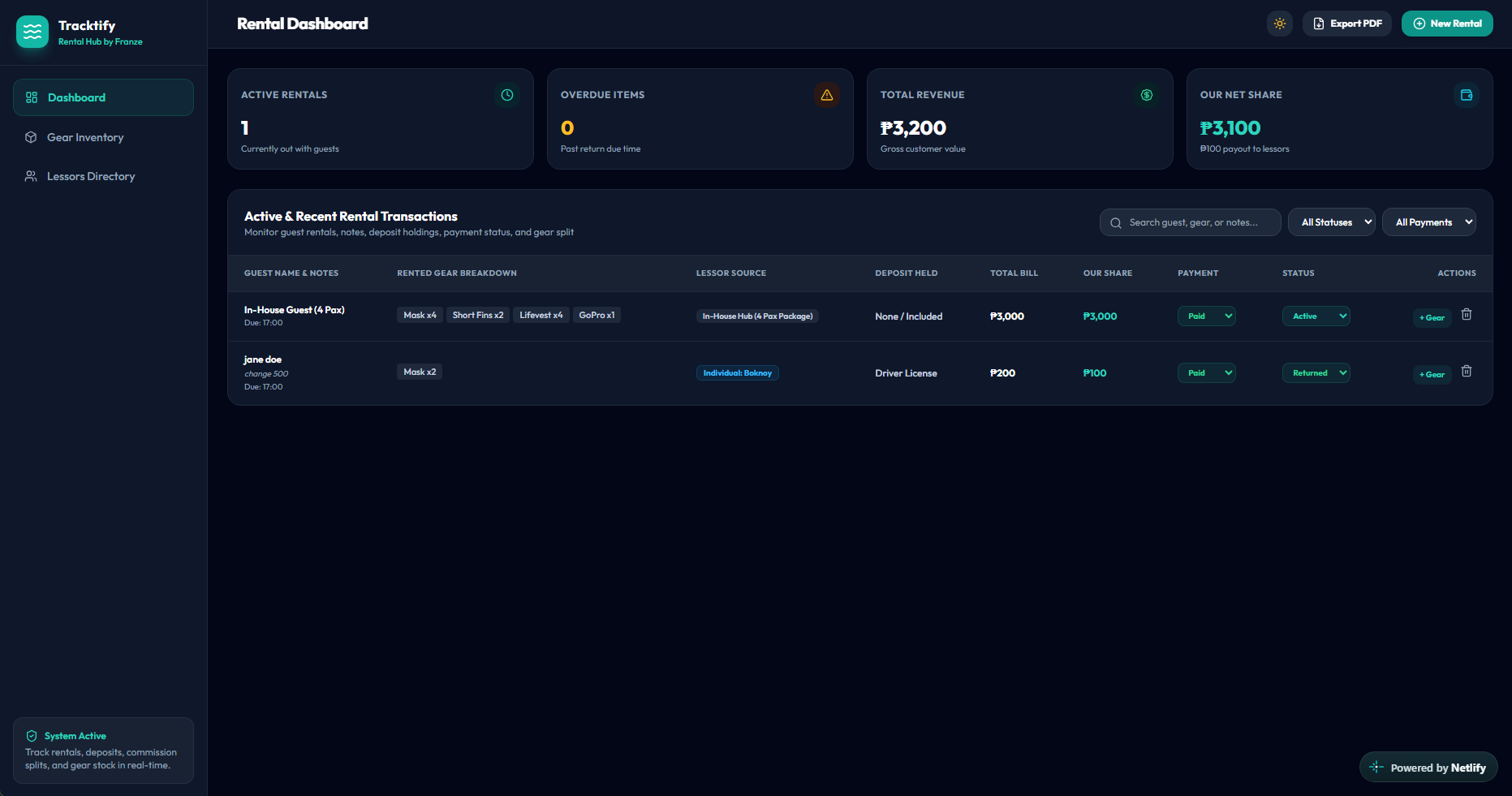
The dashboard opens with four summary cards: active rentals, overdue items, total revenue, and the operation's net share. Below the summary, a transaction table brings current and recent rentals together for review.
The table includes guest name and notes, rented gear breakdown, lessor source, deposit held, total bill, business share, payment status, rental status, and row actions. Search and status/payment filters help narrow the list. A new-rental action is available from the top bar, and the table supports adding gear to a transaction or removing a record.
Gear Inventory
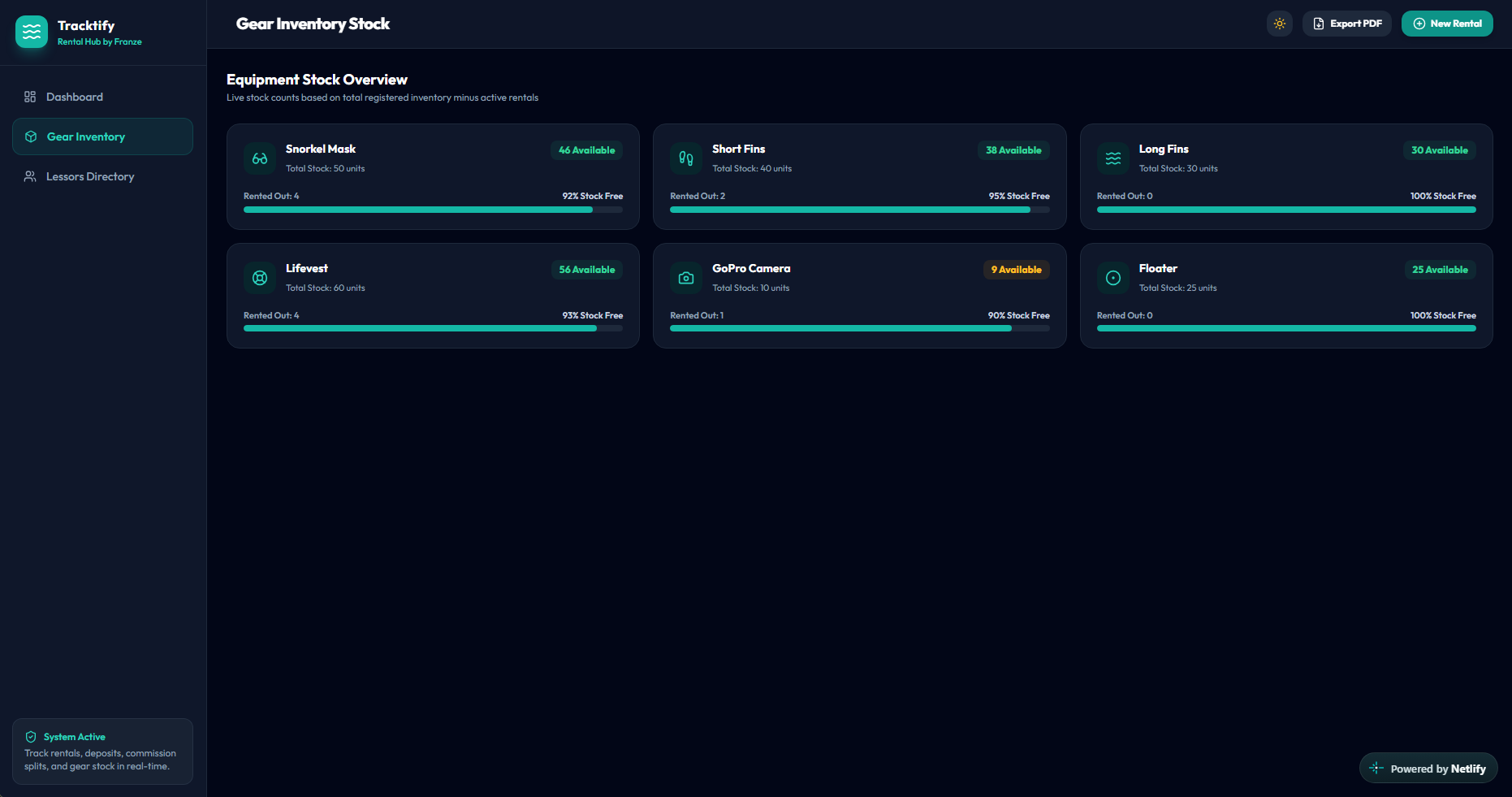
The inventory view summarizes equipment by item and makes stock state visible. The demonstrated categories include snorkel masks, short fins, long fins, life vests, GoPro cameras, and floaters. Each item shows total stock, quantity rented out, quantity available, and the share of stock that remains free.
Lessors Directory
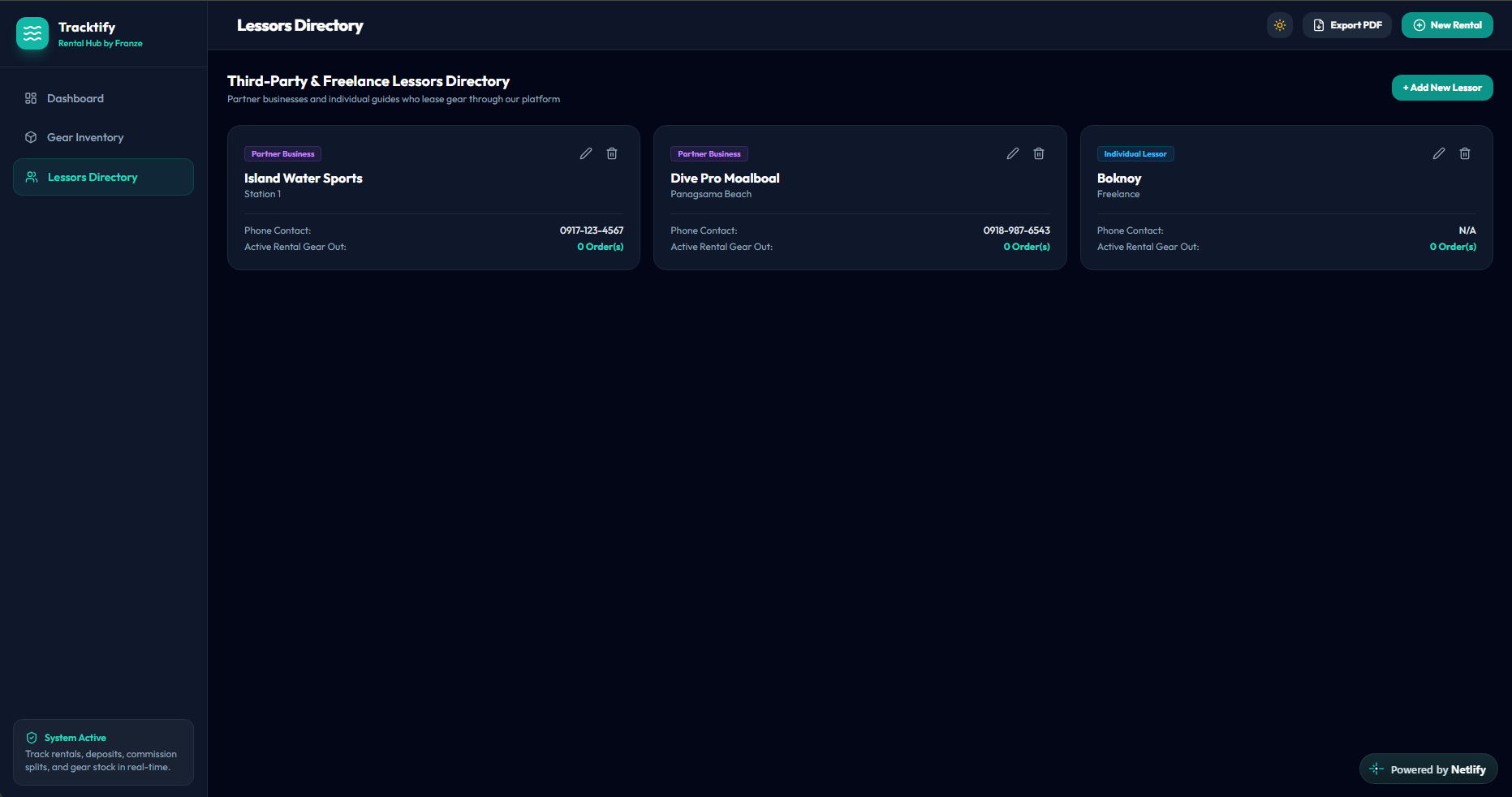
The directory distinguishes partner businesses from individual lessors. Entries include contact details and active gear-out counts, helping the operator see where equipment comes from and what is currently in circulation.
Global Actions
The shared header provides a theme control, PDF export, and a new-rental action. The lessors view also provides a direct way to add a lessor. A system-status panel describes the app's focus on rentals, deposits, commission splits, and gear stock.
Rental Workflow
- Maintain the catalog. Register the available gear and its stock quantities.
- Record the rental. Start a new rental, capture guest details and notes, and list the equipment being rented.
- Identify the source. Associate rented gear with in-house stock, a partner business, or an individual lessor.
- Record the financial details. Track the bill, deposit held, payment status, and the split between gross amount and the operation's share.
- Monitor the rental. Use active, overdue, and returned statuses to understand what needs attention.
- Reconcile stock and earnings. Review availability and transaction totals as equipment moves through rentals.
Gear + Guest + Lessor → Rental record → Payment and deposit → Return status → Updated availability
Feature Details
Rental Operations
- Active and recent rental transaction list
- Overdue rental visibility
- Guest names and transaction notes
- Rented equipment breakdown
- Payment and rental-status controls
- New rental and add-gear actions
Inventory
- Stock totals by equipment type
- Available and rented-out quantity visibility
- Stock-free progress indicators
- Support for masks, fins, life vests, cameras, and floaters
Financial Tracking
- Total revenue and net-share summaries
- Deposit-held and total-bill fields
- Lessor source and business-share details
- PDF export
Lessor Management
- Partner-business and individual-lessor records
- Contact information
- Active gear-out counts
- Add-lessor action
Interface Structure
Dashboard-first workspace
A persistent side navigation separates Dashboard, Gear Inventory, and Lessors Directory. The main panel changes with the selected work area, keeping the tool's three core responsibilities easy to locate.
High information density with clear grouping
The rental table needs to show many fields at once. Summary cards separate top-level indicators from individual transaction details, while table headings, row spacing, and compact controls help maintain scanability.
Color for status and emphasis
The dark navy interface uses teal for primary actions and positive values, with a contrasting warning color for overdue items and low-stock situations. This gives operators a quick visual cue without relying on color alone: labels and values remain visible in the interface.
Operational controls stay close to the work
Creating a rental, exporting a PDF, changing theme, filtering transactions, and managing equipment are placed near the dashboard or the relevant section, reducing the need to leave the current workflow.
Product and Workflow Decisions
Separate the three core domains
Rentals, equipment stock, and lessor records are related but serve different tasks. Giving each a dedicated section keeps the interface organized while the rental table brings their information together when it matters.
Show both gross activity and net share
Total revenue and the operation's share answer different business questions. Showing both avoids making the gross amount look like the full amount retained by the rental operation.
Make stock availability visible
Total stock alone is not enough during rental operations. Available and rented-out counts make it easier to judge whether equipment can be promised to another guest.
Distinguish lessor types
Partner businesses and individual lessors can have different contact and payout relationships. Clear type labels help users identify the source of stock and understand who is associated with a rental.
Challenges
Keeping rental, inventory, and lessor data connected
A rental affects more than a transaction total. It identifies the guest, consumes available gear, may involve a third-party lessor, and carries payment and return statuses.
Design response: Bring these related fields into the rental record and provide dedicated inventory and lessor views for deeper management.
Making financial splits understandable
When equipment comes from different sources, the gross rental amount and the operation's share are not always the same.
Design response: Display the total bill, deposit held, lessor source, and operation share as separate details so users can review the transaction without conflating amounts.
Managing a busy dashboard
Operators need quick status checks as well as detailed transaction records.
Design response: Put key totals in summary cards and use search and filters to help locate individual rentals in the detailed table.
Outcome
Tracktify brings rental transactions, snorkeling gear inventory, and lessor records into a single operational interface. The dashboard connects the daily work of checking availability, tracking equipment, recording payments, and monitoring returns with a high-level view of revenue and the operation's share.
Know what is rented → Know what is available → Know who supplied it → Know what needs follow-up
What I Learned
- Operational dashboards need actionable summaries. Metrics are most useful when users can move directly from an alert or total to the relevant records.
- Availability depends on transaction state. Stock counts need to reflect equipment currently out on rent, not only the size of the catalog.
- Financial labels matter. Revenue, deposits, and net share are related but distinct values and should be presented separately.
- Ownership affects the workflow. Tracking the source of equipment is important when inventory is shared across a business and its lessors.
Potential Next Steps
- Add configurable rental durations and automatic due-time reminders.
- Provide a return and inspection workflow for recording condition, missing items, or damage.
- Expand reporting with revenue over time, utilization by gear type, and payout summaries by lessor.
- Add role-based access for owners and staff, with an audit trail for transaction changes.
- Support low-stock thresholds and clearer alerts when availability is limited.
- Review the dense transaction table on phone-sized screens and provide a compact card view where needed.
Portfolio Takeaway
Tracktify demonstrates dashboard and front-end development for a focused business workflow: rental transaction management, inventory visibility, lessor tracking, and revenue-share reporting.
The product is organized around the core question an operator needs to answer: what equipment is out, who is responsible for it, and what needs attention next?